

Introduction
What the Symptom & Illness Check API does, the four-step shape of every integration, and what you need before the first call.
The Symptom & Illness Check (SCIC) API lets you embed XUND's medically validated symptom checks and illness checks into your own product over REST: the patient answers a series of questions, and you receive a structured report of possible causes. If you'd rather not build a UI at all, the separate Symptom & Illness Check App product is a pre-built, embeddable widget over the same engine.
What an integration looks like
Every check follows the same four-step shape:
- Initialize a symptom check or illness check and receive a
checkId. - Question-answer loop — fetch the next question, post the patient's answer, repeat.
- Overview — show the patient what they entered, let them edit it, then confirm.
- Report — fetch the result as JSON or PDF.
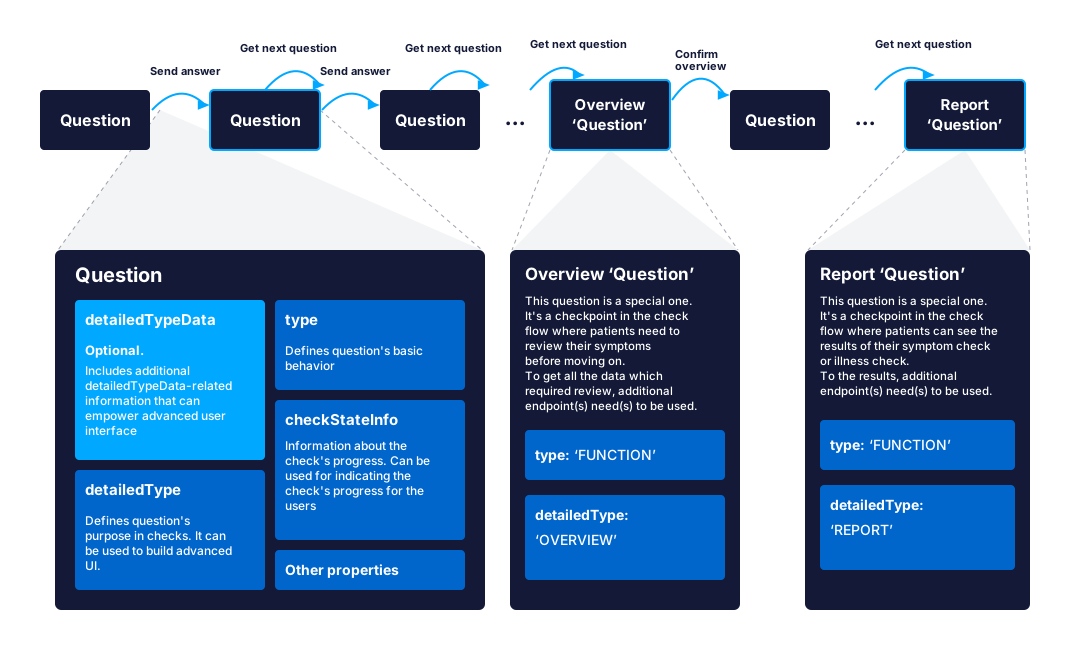
The API Concept page walks through this flow call by call, including a full request/response example.
What you need
- Your Client Id and API key — XUND provides them during onboarding, and you exchange them for a Bearer token; see Authentication.
- The base URL:
https://medical.api.xund.solutions. - A
languageheader on most calls — an ISO 639-1 code such asen,de, orde-formalfor formal variants. Content is fully finalized inen,de, andde-formal; other languages are accepted, but confirm coverage with XUND before relying on them. - The Implementation Guidelines — read them before you design your UI. They are conditions of using the API, and XUND runs an acceptance test against them before production launch.
Where to go next
- General — request headers, vocabulary, the check flow, authentication, and the compliance rules for going live.
- Your first check — go from credentials to a finished report with a runnable script.
- API Reference — every endpoint with parameters, schemas, and response codes.
- Example apps — runnable projects on GitHub, such as a Node.js backend that gets a token and calls the API.
Last updated on