

API Concept
Check types, initialization, and the question-answer loop that drives a check to its report.
Check types
- Symptom check — start with POST /v1/chatbot/initialize/symptomCheck when the patient has a bothering symptom. The check focuses on the reported symptoms.
- Illness check — start with POST /v1/chatbot/initialize/illnessCheck when the patient wants to check whether they might have a specific illness. The check gathers everything relevant to that one illness.
Both accept an optional FHIR patient resource to prefill demographics (a symptom check also accepts basic bodyParameters instead), and let you skip the first selection step by providing a starting point directly (mainSymptomId/bodyPartCode for a symptom check, an ICD-10 condition code for an illness check).
Initialization and the check id
A successful initialization call returns a checkId in the response body:
{ "checkId": "5e93d7a1-f240-43b5-8937-33419ea9cb6a" }From then on, send it back as a check-id request header on every call for that check (GET /v1/chatbot/question, POST /v1/chatbot/answer, GET /v1/chatbot/report, ...). XUND doesn't identify patients itself, so checkId is the only handle you get on a session — storing and linking it to your own user records, if at all, is entirely up to you. Treat it as a secret per-patient handle: anyone holding your token plus a checkId can read that check's data, so never expose one patient's checkId to another client.
Question-answer flow
Once initialized, fetch the first question with GET /v1/chatbot/question and answer it with POST /v1/chatbot/answer. Keep repeating get-question/post-answer until you get a Question whose detailedType is one that requires confirming a function instead of answering normally:
detailedType | Complete it with |
|---|---|
OVERVIEW | POST /v1/chatbot/overview/confirm (after fetching GET /v1/chatbot/overview) |
SYMPTOM_CHECK_REPORT / ILLNESS_CHECK_REPORT | fetching GET /v1/chatbot/report (or the PDF) — this ends the check |
Confirming the overview resumes the question-answer loop; fetching the report ends the check.
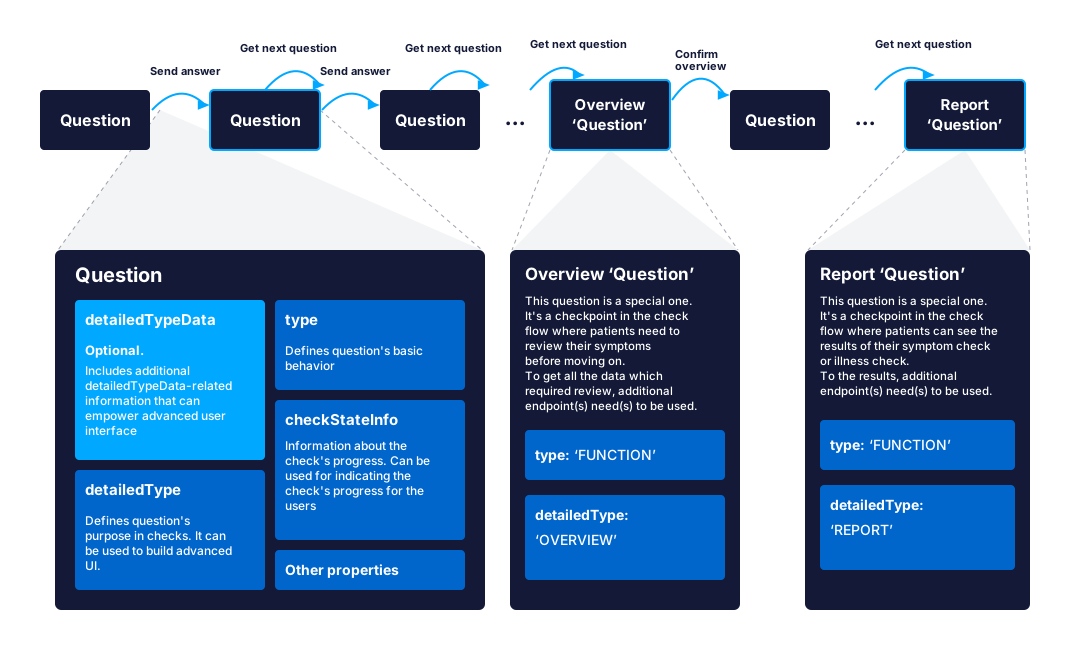
Example: starting an illness check
A concrete walkthrough, starting from a completely empty initialization — no prefilled demographics, no preselected illness. That's the slowest path through the flow: the check asks for age, then gender, before it can offer an illness to check. Each call below feeds into the next. Note that the exact question texts, ids, and validators vary with XUND's medical-content version (a live environment may ask "How old are you?" with an age regex where this example asks for a birth year) — treat the JSON shapes as the contract, not the literal values.
1. Initialize with an empty body.
// POST /v1/chatbot/initialize/illnessCheck
{}
// 200 response
{ "checkId": "5e93d7a1-f240-43b5-8937-33419ea9cb6a" }2. Get the first question. Nothing is known yet, so age is asked first:
// GET /v1/chatbot/question
// headers: check-id: 5e93d7a1-f240-43b5-8937-33419ea9cb6a
{
    "id": "fadc8892-a7b0-473c-a67d-e8e676f0551f",
    "text": "In which year were you born?",
    "isSkippable": false,
    "isAnswered": false,
    "type": "TEXT",
    "detailedType": "AGE",
    "checkStateInfo": { "state": "PROFILE", "detailedState": "AGE" },
    "answerValidatorRegex": "^(19[0-9][0-9]|20[01][0-9]|202[0-2])$"
}
3. Answer it.
// POST /v1/chatbot/answer
{
    "questionId": "fadc8892-a7b0-473c-a67d-e8e676f0551f",
    "answer": { "value": "1980" }
}
// 200 response
{ "checkStatus": "IN_PROGRESS" }4. Get the next question. Age is now known but gender isn't, so gender comes next:
// GET /v1/chatbot/question
{
    "id": "a76a62b7-657d-4f03-be77-366ffeba1de2",
    "text": "What is your biological gender?",
    "isSkippable": false,
    "isAnswered": false,
    "type": "SINGLE_SELECT",
    "detailedType": "GENDER",
    "checkStateInfo": { "state": "PROFILE", "detailedState": "GENDER" },
    "options": {
        "count": 2,
        "values": [
            { "id": "b23eb6b5-fc24-4a49-bf7d-ab695c8f04a1", "text": "Male", "isSelected": false, "type": "SURVEY_ANSWER" },
            { "id": "80e5d6f2-d486-45c7-8e3e-7e73e3dd0519", "text": "Female", "isSelected": false, "type": "SURVEY_ANSWER" }
        ]
    }
}
5. Answer it by sending the chosen option's id.
// POST /v1/chatbot/answer
{
    "questionId": "a76a62b7-657d-4f03-be77-366ffeba1de2",
    "answer": { "id": "80e5d6f2-d486-45c7-8e3e-7e73e3dd0519" }
}
// 200 response
{ "checkStatus": "IN_PROGRESS" }6. Get the next question. Age and gender are now both known, so the check offers the illness selector — this is what detailedType: "ILLNESS_SELECTOR" looks like:
// GET /v1/chatbot/question
{
    "id": "b1e6a9d1-6c2f-4b3a-9c8e-2f6a1d9b4e7a",
    "text": "Which illness would you like to check?",
    "isSkippable": false,
    "isAnswered": false,
    "type": "SINGLE_SELECT",
    "detailedType": "ILLNESS_SELECTOR",
    "checkStateInfo": { "state": "PROFILE", "detailedState": "ILLNESS_SELECTION" },
    "options": {
        "count": 2,
        "values": [
            {
                "id": "e92ce87d-1f79-4ce2-85d7-9ce30a8ab433",
                "type": "ILLNESS",
                "text": "Diverticulitis",
                "isSelected": false,
                "description": "An inflammation of a diverticulum, a small pouch in the intestinal wall.",
                "alternativeTexts": ["Diverticula inflammation"]
            },
            {
                "id": "25dbb005-7835-4a05-ba9a-cf78a62e35f2",
                "type": "ILLNESS",
                "text": "COVID-19 infection",
                "isSelected": false,
                "description": "A highly contagious viral disease caused by SARS-CoV-2.",
                "alternativeTexts": ["Coronavirus disease-2019"]
            }
        ]
    }
}
From here on it's the same POST /v1/chatbot/answer pattern as any other SINGLE_SELECT question — send the chosen option's id — which moves the check into that illness's survey questions, and eventually to OVERVIEW and ILLNESS_CHECK_REPORT.
The dispatcher only asks for what it doesn't already have: prefill patient.birthDate/gender (or a full FHIR patient resource) at initialization and steps 2–5 disappear — step 2 returns ILLNESS_SELECTOR directly. Prefill a condition (ICD-10 code) instead, and ILLNESS_SELECTOR never appears at all — the illness is already picked.
Overview
Before the report, the check surfaces an overview of everything the patient added — GET /v1/chatbot/overview returns the added and suggested-but-not-added symptoms. Show these to the patient so they can add, edit, or remove symptoms before confirming; POST /v1/chatbot/overview/confirm won't succeed until the overview has been fetched.
Report
GET /v1/chatbot/report returns the check's result as a SymptomCheckReport or IllnessCheckReport, depending on the check type. A PDF version of the same report is available from GET /v1/chatbot/report/pdf.
Last updated on